Real-world Federated Learning Tutorial
This tutorial shows how to use the MEDfl.rw (real-world) module to run a
true multi-machine federated learning experiment:
One central server (orchestrator)
Several remote clients (hospitals / institutions)
Each client keeps its data local in a CSV file
The server enforces a shared schema (same features/target on all sites)
Validation / test splits are done per client, with optional overrides
Optional Differential Privacy (DP) configuration per client
High-level architecture
In real-world mode, MEDfl is organized as follows:
-
FederatedServer: wraps the Flower server and coordinates the trainingStrategy: defines the aggregation and training hyperparameters
-
FlowerClient: local client that loads CSV data, applies splits, trainsDPConfig: optional configuration for differential privacy
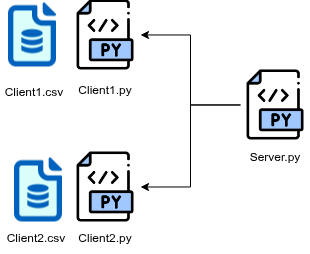
The typical workflow is:
Prepare a CSV dataset on each client machine.
Configure and start the server on a reachable host.
Configure and start the clients, pointing them to the server.
Monitor federated rounds and collect saved models and metrics.
1. Preparing client data
Each client will load data from a local CSV file. All clients must share:
The same feature columns
The same target column
An optional ID column (for split_mode based on IDs)
Example structure of a client CSV file:
id,MajorAxisLength,Area,Eccentricity,ConvexArea,label
0,134.12,10023,0.88,10450,1
1,120.57,8900,0.76,9100,0
2,143.34,11010,0.91,11300,1
...
In this tutorial, on the client machine we will use:
../data/client1_with_id.csv
with:
idas the identifierMajorAxisLength, Area, Eccentricity, ConvexAreaas featureslabelas the target column
2. Server configuration
Create a file called run_server.py on the server machine.
# run_server.py
from MEDfl.rw.server import FederatedServer, Strategy

# Optional: build a list of test IDs (here 0..1499)
test_ids = list(range(1500))

# Optional per-client overrides:
# keys must match the hostname seen by MEDfl on each client machine.
client_fractions = {
    "dinf-medomi-05b": {
        "val_fraction": 0.10,
        "test_ids": list(range(1500)),  # here: all IDs used for test
    }
}

custom_strategy = Strategy(
    name="FedAvg",
    fraction_fit=1.0,
    min_fit_clients=1,
    min_evaluate_clients=1,
    min_available_clients=1,

    local_epochs=10,
    threshold=0.5,
    learning_rate=0.01,
    optimizer_name="SGD",

    saveOnRounds=3,        # save the model every 3 rounds
    savingPath="./",       # where to store the checkpoints
    total_rounds=10,

    # --- Data schema enforcement ---
    features="MajorAxisLength,Area,Eccentricity,ConvexArea",  # comma-separated feature names
    target="label",                                           # target column name

    # --- Default split configuration (can be overridden per client) ---
    val_fraction=0.15,
    test_fraction=0.10,

    # --- Splitting strategy ---
    split_mode="per_client",  # split done independently on each client
    id_col="id",              # ID column used for test_ids-based splits

    # --- Optional per-client overrides ---
    client_fractions=client_fractions,
)

server = FederatedServer(
    host="0.0.0.0",   # listen on all interfaces
    port=8080,        # port to expose to clients
    num_rounds=10,
    strategy=custom_strategy,
)

if __name__ == "__main__":
    server.start()
Key parameters
features: comma-separated list of feature names expected in each client CSV.target: target column name for supervised learning.split_mode="per_client": each client performs its own train/val/test split.id_col: column name containing sample IDs. Used when you want to define test sets usingtest_ids.val_fractionandtest_fraction: default fractions of data used for validation and testing on each client.client_fractions: per-client overrides, indexed by the hostname seen by MEDfl on that machine. You can override:val_fractiontest_fractiontest_ids(list of IDs that must go to the test set)
saveOnRoundsandsavingPath: control how often and where the model checkpoints are saved.
3. Client configuration
On each client machine (e.g. each hospital), create a file
run_client.py (or run_client_override_splits.py) similar to:
# run_client_override_splits.py
from MEDfl.rw.client import FlowerClient, DPConfig

client = FlowerClient(
    server_address="100.65.215.27:8080",  # IP:port of the server
    data_path="../data/client1_with_id.csv",
    seed=42,
    dp_config=None,                      # or a DPConfig instance (see below)
)

if __name__ == "__main__":
    client.start()
Parameters:
server_address: must point to the public / reachable address of the server (as configured inFederatedServer).data_path: local path to the CSV file on this client machine.seed: used for deterministic splits.dp_config: optional differential privacy configuration (see next subsection).
4. Enabling Differential Privacy (optional)
To enable differential privacy on a client, create a DPConfig instance
and pass it to FlowerClient:
from MEDfl.rw.client import FlowerClient, DPConfig

dp_conf = DPConfig(
    noise_multiplier=1.0,
    max_grad_norm=1.0,
    batch_size=32,
    secure_rng=False,
)

client = FlowerClient(
    server_address="100.65.215.27:8080",
    data_path="../data/client1_with_id.csv",
    seed=42,
    dp_config=dp_conf,
)

if __name__ == "__main__":
    client.start()
Typical hyperparameters:
noise_multiplier: controls the magnitude of the added noise (higher = more privacy, more utility loss).max_grad_norm: gradient clipping norm.batch_size: local training batch size.secure_rng: whether to use a cryptographically secure RNG.
5. Running the experiment
Once both sides are configured:
On the server machine:
python run_server.pyThe server will start and wait for clients to connect.
On each client machine:
python run_client_override_splits.pyEach client will:
Load its local CSV data
Apply the default or overridden splits
Participate in federated training rounds coordinated by the server
During training:
The server runs for
num_rounds(here 10).Every
saveOnRoundsrounds (here 3), a checkpoint is written tosavingPathon the server (./ in the example).Metrics (loss, accuracy, etc.) are logged via the strategy / server logic implemented in
MEDfl.rw.
6. Customizing splits per client
Sometimes you want fine-grained control over how each client splits its
data. MEDfl allows this through the client_fractions dictionary.
Example: a client with hostname dinf-medomi-05b should:
Use 10% of its data as validation,
Use a specific set of IDs as test data.
client_fractions = {
    "dinf-medomi-05b": {
        "val_fraction": 0.10,
        "test_ids": list(range(1500)),  # IDs 0..1499
    }
}

custom_strategy = Strategy(
    # ...
    client_fractions=client_fractions,
)
On that specific machine:
The effective validation fraction will be 0.10 (instead of the default 0.15).
Samples whose
idis intest_idswill be forced into the test set.
Note
Make sure that:
The hostname key (e.g.
"dinf-medomi-05b") exactly matches the name seen by MEDfl on the client machine.The
id_colin the strategy configuration matches the ID column in the client CSV files.
7. Summary
In this real-world tutorial, you have learned how to:
Prepare local CSV datasets for each client
Configure a FederatedServer with:
a specific aggregation strategy (
FedAvg)enforced feature/target schema
default and per-client validation/test splits
checkpoint saving
Configure and run FlowerClient instances on remote machines
Optionally enable Differential Privacy using
DPConfig
This setup corresponds to a true multi-institution environment where data never leaves the client machines, and only model updates are exchanged.